
Common pitfall in ESEF tables and how to avoid it

Reminder - readability in ESEF
Notes to the financial statements are “block tagged” in the European Single Electronic Format (ESEF). This means that companies are expected to select and identify whole sections of their notes and identify its theme(s) among a predefined list.
This allows a contextualised extraction of text from the financial statements, which is for instance particularly useful for human comparison, or to improve Artificial Intelligence accuracy while decreasing the cost of its use. There are two main categories of approaches to ensure that the extracted content is understandable after extraction.
The first one is commonly used when the report was created after conversion from a PDF. This approach attempts to make it so that after extraction, the same text boxes can be found in the same position as in the original report. This gives results like the following:
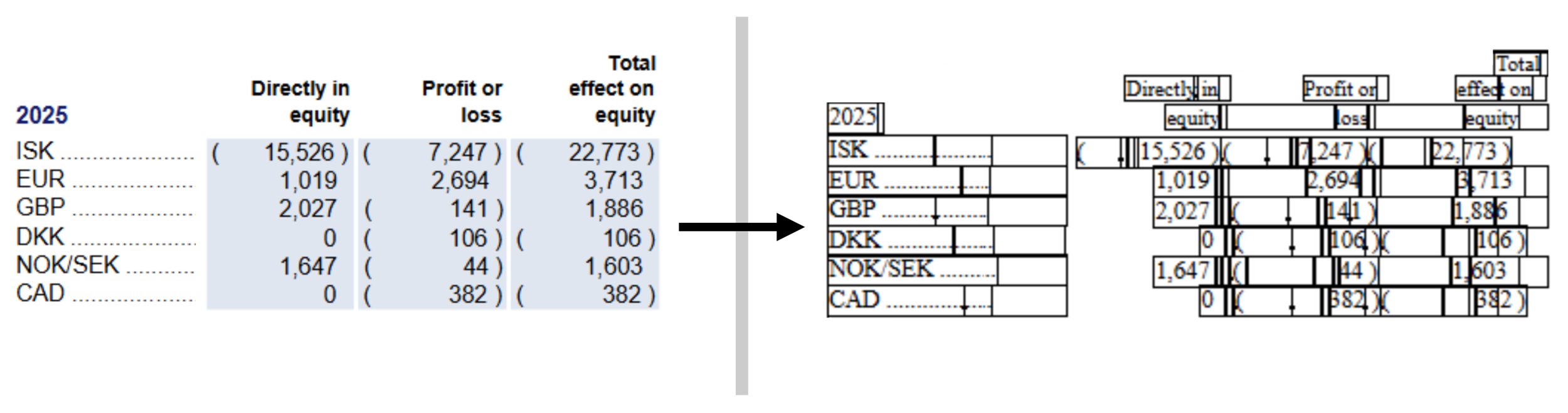
On the left: before extraction. On the right, after extraction; black outlines have been added around the ‘cells’ that delimit text. Example from the Icelandair Group Consolidated Financial Statements 2025.
The second one is commonly used when the report was created directly as a digital document; it can also be applied after a conversion from a PDF as an enhancement to the document. With this approach, the content to be extracted already is under a format made to be ‘responsive’, and therefore no additional technique is usually needed. This gives results like the following:
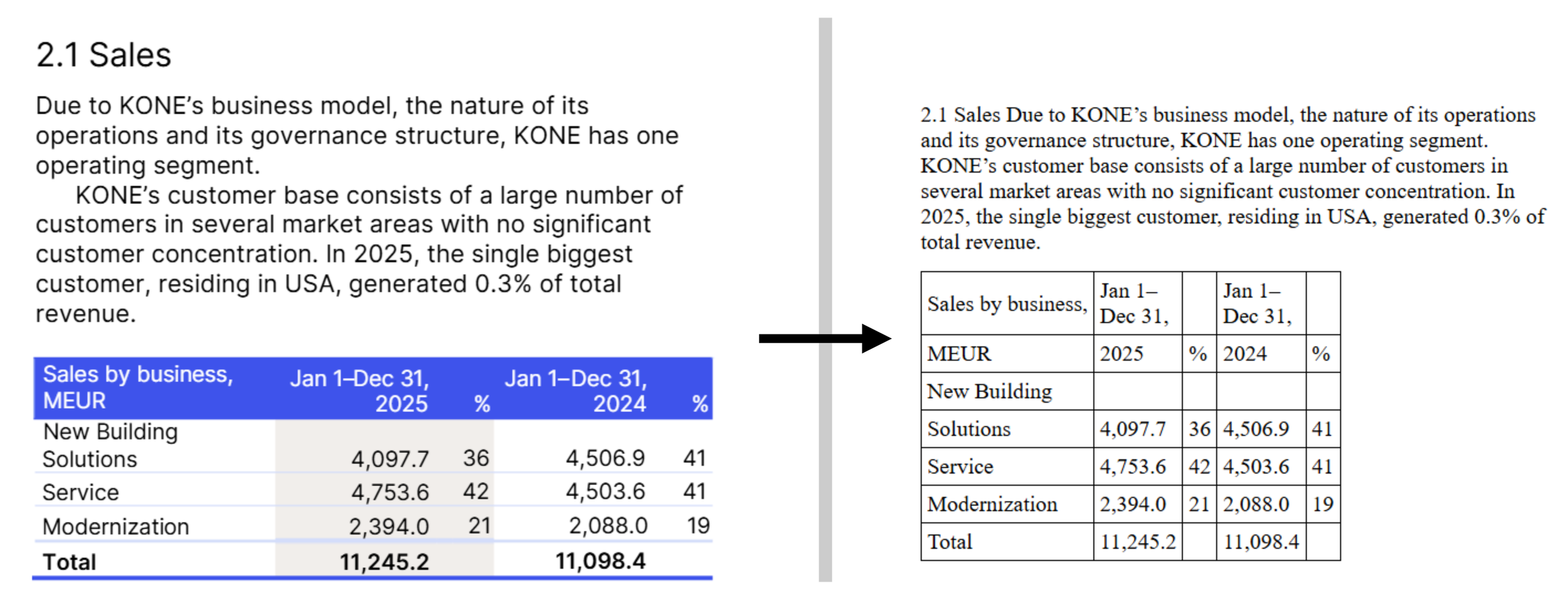
On the left: before extraction. On the right, after extraction; black outlines have been added around the ‘cells’ that delimitate text. Example from the KONE Annual Review 2025.
The ‘natively-digital’ approach not only entails much less technical risk, but as you can immediately see above, the output is also usually much better formatted, for humans as well as for machines. When this output used with AI, the difference in quality is also quite striking.
Common pitfall in the natively-digital approach
As mentioned above, the natively-digital approach is generally safer. As long as the structure of your report is extracted, the rules of a web page ensure that there is no overlapping text in your content, and also ensure that your content is formatted in a way consistent with what it was in your report.
As long as the structure of your report is extracted.
Have you ever been annoyed when trying to copy and paste tables into your favourite spreadsheet? You try it once and it works perfectly, but then on the second table it decides to paste it all in a single cell and you get an unusable long string of smushed text of all your table cells.
The same can and does happen in ESEF as well.
(As a small note, I have taken examples here from KONE’s report, which is otherwise of good quality. It was selected because it brings multiple examples of the issue at hand. The examples I show here are not meant as a criticism of the work done by any party involved in the creation and the tagging of the report.)
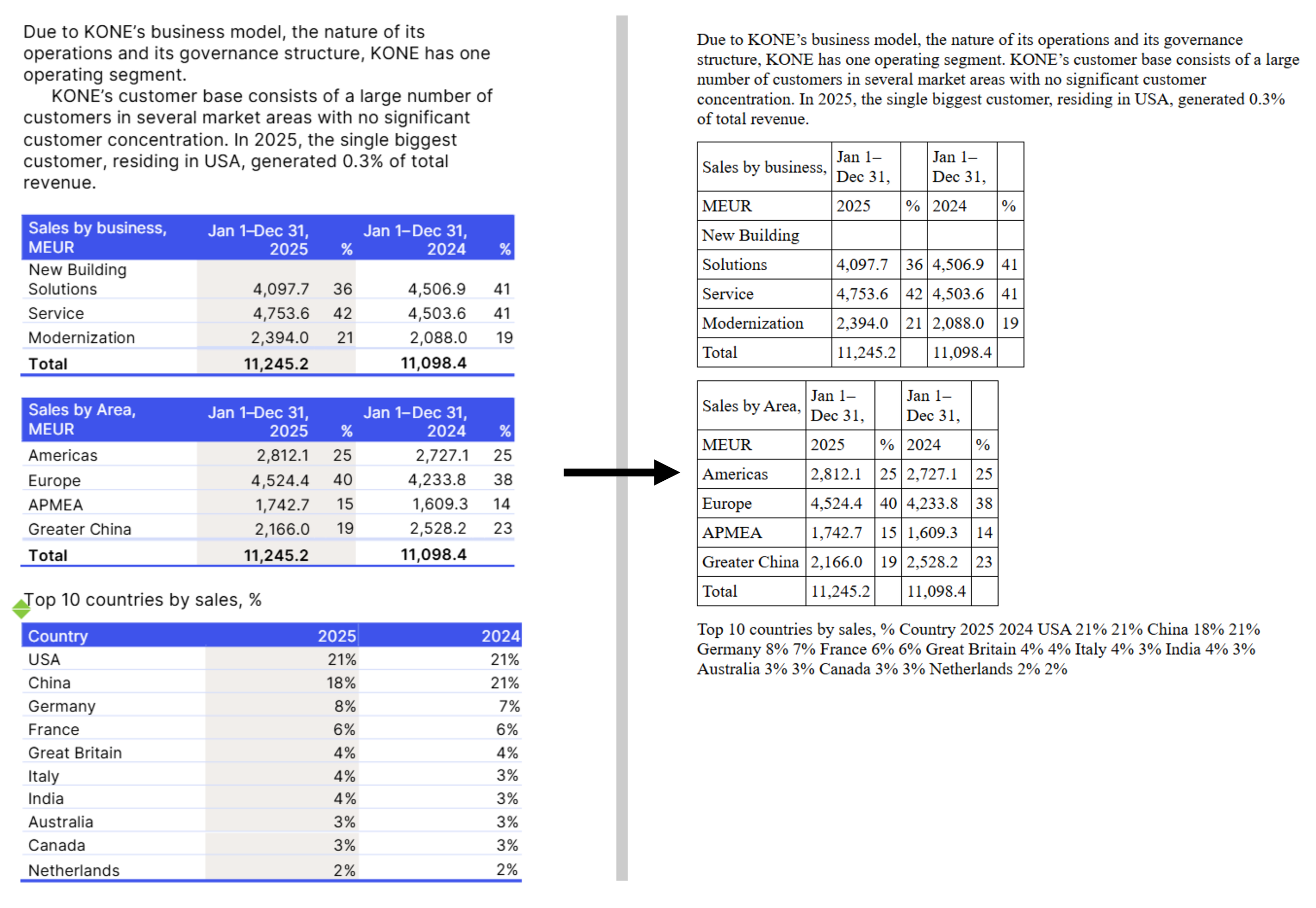
Extraction of the disclosure related to segment reporting in the KONE Annual Review 2025
What happened to the last table, “Top 10 countries by sales, %”? Just like for our unsuccessful spreadsheet copy-paste, we have a single string instead of the table we wanted.
A digital document, for instance a web page, is made of code. Part of that code can be directly seen on your screen, for instance the text inside the table cells; but most of the code is not directly visible; it is made of instructions on how to format the visible parts.
In particular, around a table, there is code that carries the meaning of “the text boxes inside me are table cells, organised in rows and columns”. When you select a table in your browser and copy it, you may or may not select that code. If you do, when you paste it in the spreadsheet, it will understand the intended table structure. If you don’t… you just end up with all your text in a single cell. The exact same happens with the ESEF mark-up. If you did not mark-up the (invisible) part that serves to convey the table structure, then it ends up flat after extraction.
Here are a few other examples from the same document:
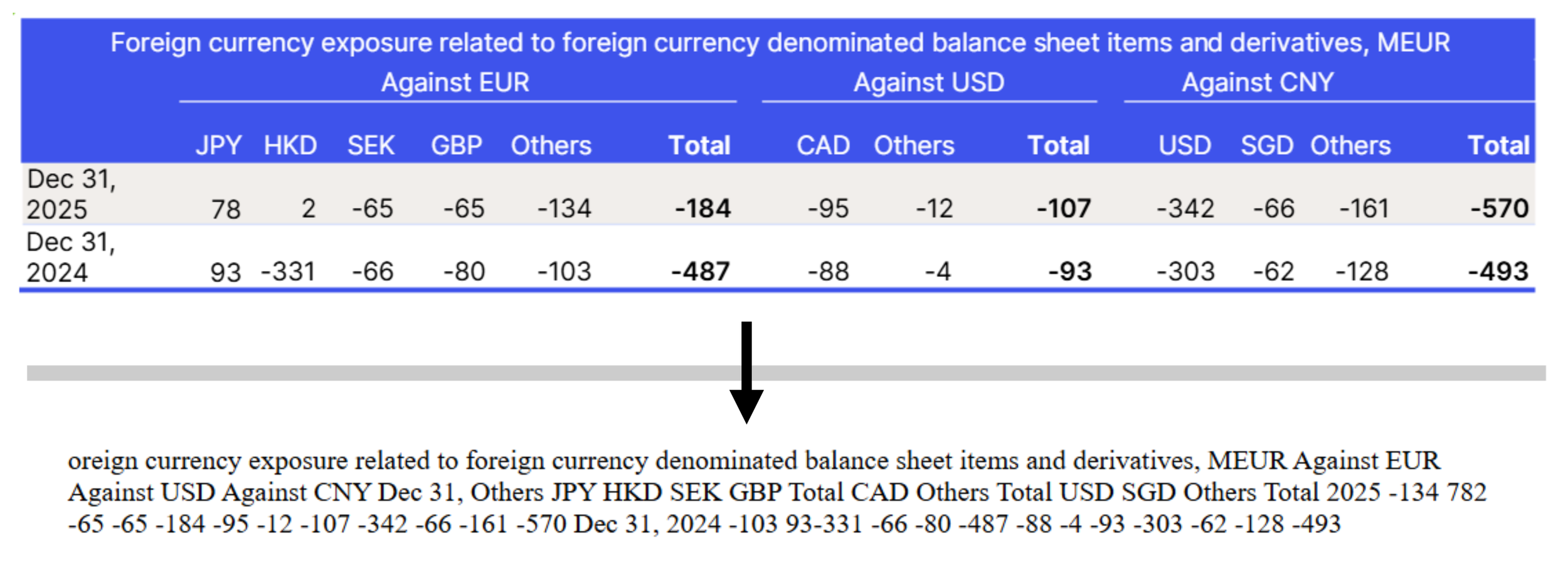
Extraction of the disclosure related to market risk in the KONE Annual Review 2025
The example above tells the story quite clearly: as you can see, the initial “F” is missing in the extraction. The company only selected the “inside” of the table, even missing the first letter in the first cell. It follows that it did not select the invisible table code around the table, and so it is not properly readable in the output.
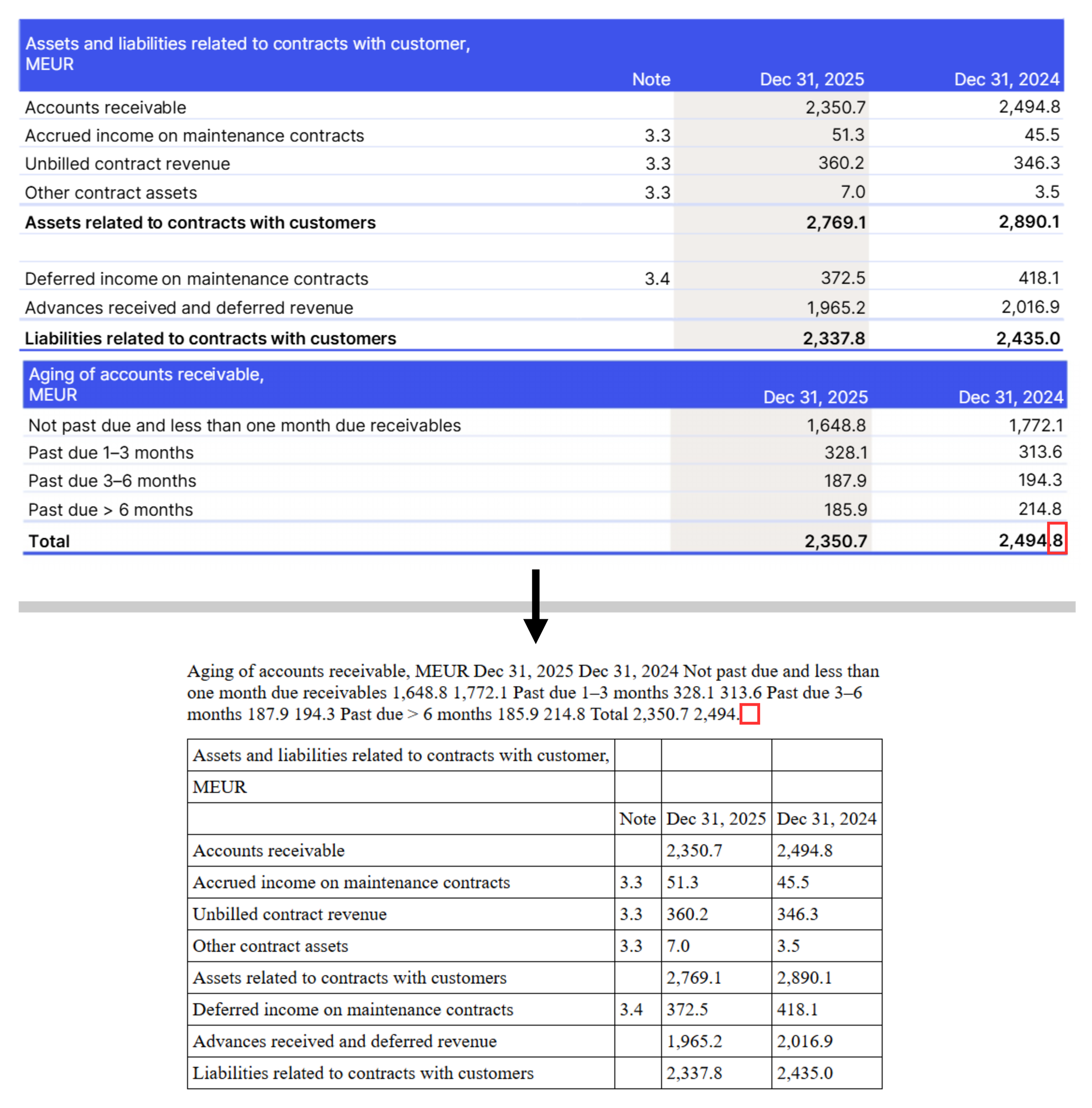
Extraction of the disclosure related to financial instruments in the KONE Annual Review 2025. The red outlines have been added to highlight the missing text.
This example also shows quite clearly the pitfall. As we highlight, this time it is the end of the table that was not selected, and just as before we end up with an unusable string of text.
How to avoid this pitfall: the Rift validation engine
As we mentioned above, the code that needs to be selected to ensure proper formatting is invisible itself, so it can be particularly difficult for the preparer in their tagging interface to ensure they selected the table properly.
The only way to truly confirm whether a table renders properly after extraction is to use a tool that performs the extraction. Several such tools exist, notably most consumption tools and some ‘viewers’ now include such capabilities. However:
Consumption tools usually are available on published documents, not so much before publication
Reviewing with a viewer would be manual
Notes to the consolidated financial statements usually comprise about 100 tables, and if the check is manual, this means it must be done again on every version. This would be prohibitively time-consuming.
The correct way to avoid this pitfall is simple; use a validation tool that reliably automates this verification for you!
Rift Technologies’ ESEF Validation engine is the only validation engine that not only detects these occurrences, but also makes it crystal clear what the issue is and where it happened. Each misselected table gets its own dedicated explanation, so that you can solve or ask others to solve the issue efficiently.
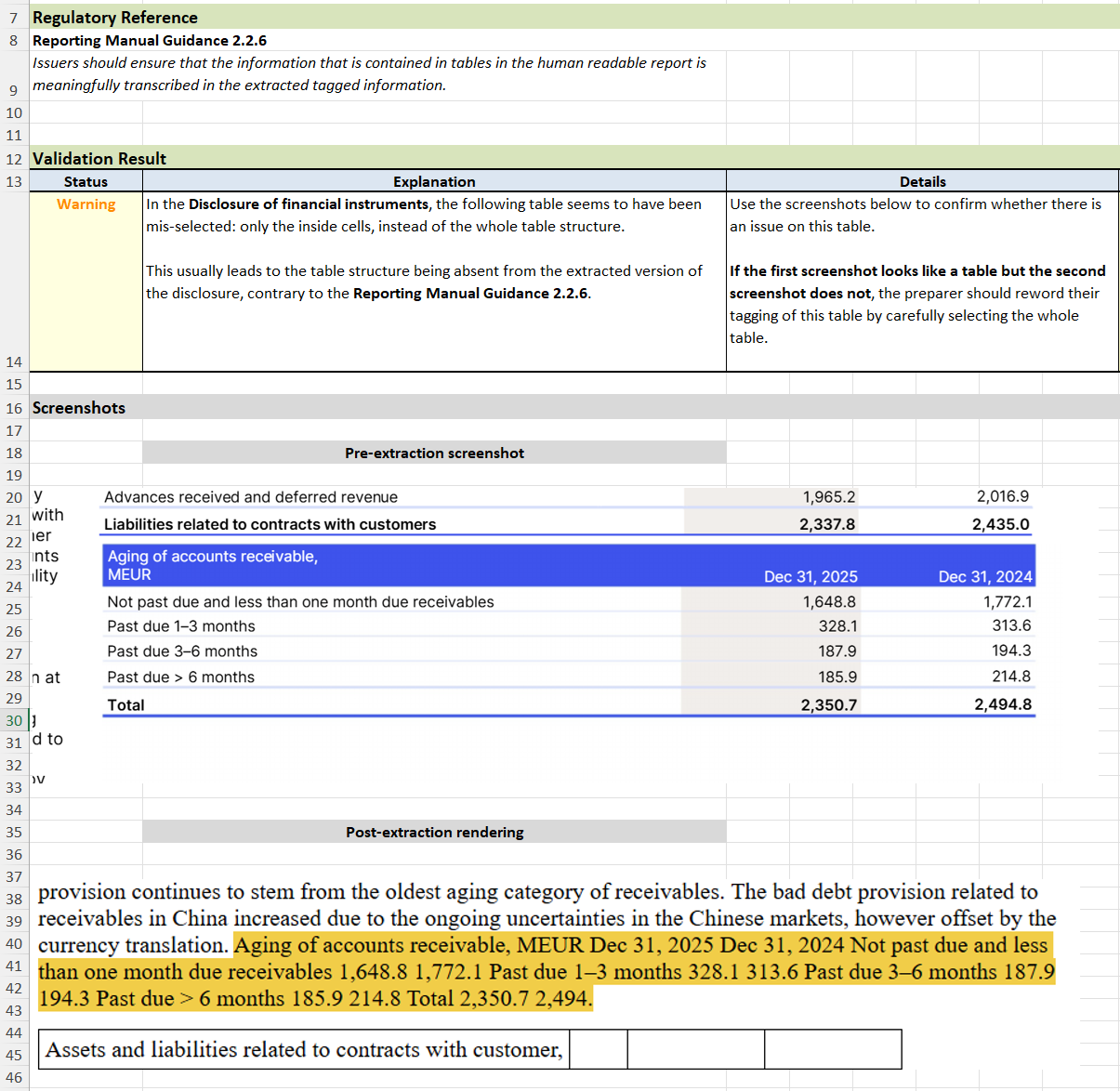
Example output from the Rift validation engine on the KONE Annual Review 2025.
Do you want to know more about these capabilities in the Rift validation engine, or about its other features? Don’t hesitate to contact us, we will be happy to discuss!
